Make sure to check out our Getting Started section in the sidebar, or CLICK HERE to visit our New Players section!
Next Event: All Hallows 226
| Event Begins In: | Production / Research Cutoff |
|---|---|
| 2026-10-30 17:00:00 | 2026-10-22 23:59:59 |
Bulletins:
October 07, 2026 - Sep 226 Festival Checkout Deadline EXTENDED
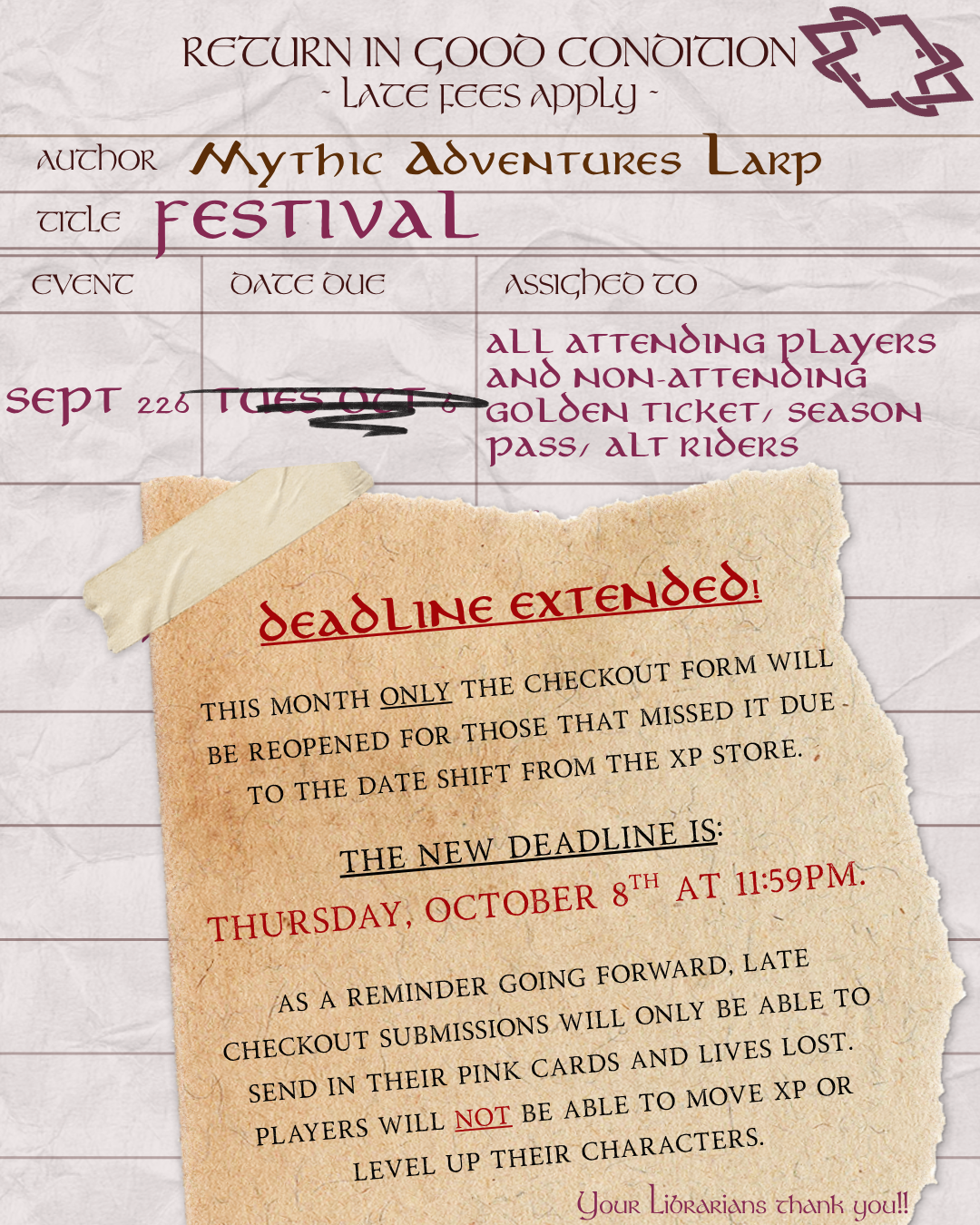
SPECIAL LIBRARY NOTICE - CHECKOUT DEADLINE EXTENDED!
This month ONLY the Checkout Form will be reopened for those that missed it due to the date shift from the XP Store.
The NEW Deadline is:
Thursday, October 8th at 11:59pm.
As a reminder going forward, late checkout submissions will only be able to send in their Pink Cards and Lives Lost. Players that wish to move XP, level up, or update their character sheets with new/improved skills should submit via the checkout form prior to the deadline. This also applies to Season Pass and Golden Ticket holders that have a character that did not attend the event.
Players will not be able to move XP or level up their characters if they miss the checkout deadline.
Checkout link can be found at: https://forms.gle/Tc8mBVfm5DpPho9Q6
Many thanks from your friendly neighborhood Librarians!
September 28, 2026 - September 2026 Checkout Form is Open
Hello Mythic Community,
The September 2026 event checkout form is open!
Checkout link is live and can be found at: https://forms.gle/Tc8mBVfm5DpPho9Q6
The deadline to submit will be 11:59pm, Tuesday, October 6th, 2026.
Thank you!
The Hero’s Library Team
Chris Mack
Krysta De Medici
Matthew Shaffer
FAQs:
- “Why do I want to submit a checkout form?”
- So your character receives all qualifying XP from playing the event.
- So you as the player can communicate to Library how much XP (if any) you wish to move from your Player XP Bank, to your character.
- So any skills your character learned/improved can be recorded by the Library and placed upon your character sheet.
- "Who should submit a checkout form?"
- Anyone that played the event either as their character, or as a Full Time Monster that wishes to move XP to their character.
- Anyone with a Golden Ticket, Season Pass, or Alt Rider that did not have their character attend the event.
- "What if I don't submit a checkout form?"
- Your character sheet will not be updated, and you will not be able to learn any new skills or improve existing skills.
- Any teaching will need to be re-done at the next event. Yes, this means you will need a new teaching chit.
- “How do I know if my form has been submitted?”
- You will receive an email receipt with your checkout form responses attached.
- "What if I am having questions or difficulty with the checkout form?"
- Please reach out to an NPL or one of the Librarians and we will be happy to help!
- "How long does it normally take for changes to appear in the portal?"
- Usually, the librarians will start to work on the checkout data as soon as we are able to, and will aim to complete changes prior to the Pre-Production/Research deadline for the next event.
- "What if I notice errors on my character sheet in the portal?"
- Please email your librarians with your name, your character name, and your question at: mythicadventuresheros@gmail.com.
- "What if my XP or item credits in the portal do not match my records?"
- Please email the library with your name and the details about your question at: mythicadventuresheros@gmail.com.
- "What if I have feedback I would like to submit?"
- Please use our anonymous form to submit feedback about the event or other areas: https://forms.gle/Kaw1WiJmRG1qHfoC6
- "OOPS, I missed the deadline. Can I still submit late?"
- The checkout form will not be reopened once the deadline has closed.
- Late checkout submissions will need to email the Librarians at: mythicadventuresheros@gmail.com.
- Subject Line:
- [Late Checkout Submission] Player Name - Character Name (MONTH YEAR)
- Body of Email:
- Player Name:
- Character Name:
- # of Lives Lost:
- Attach Pink Card
- Subject Line:
- NOTE: Players will receive credit on their character for playing the event, but will not be able to move XP or level up their characters with a late checkout submission.
September 22, 2026 - Monster Town Donation XP Opportunity
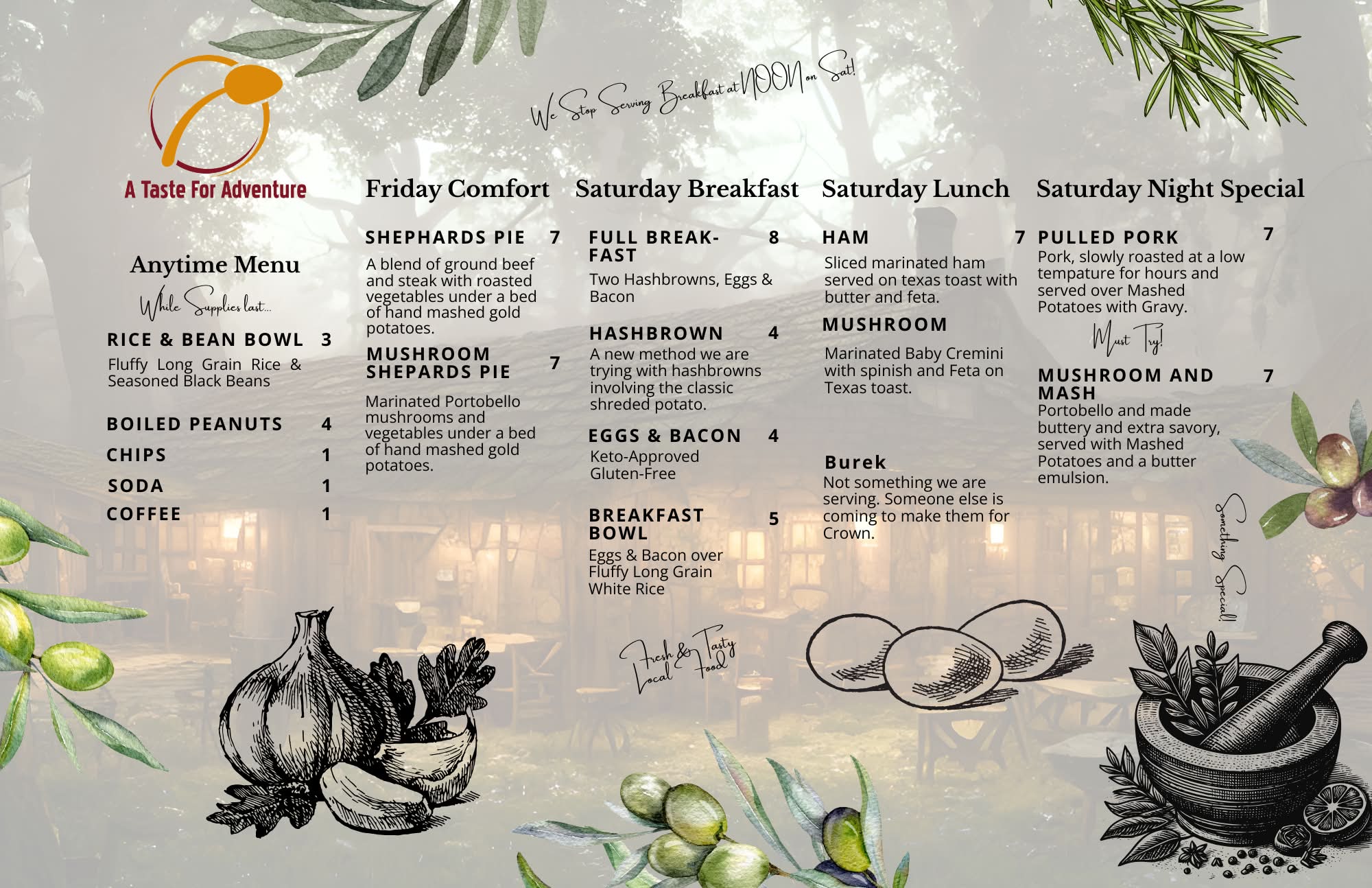
September 17, 2026 - Tavern Menu for Festival 2026!
September 16, 2026 - Metrocon and Retreat Adventure Ring EXP Stores are Live!
The moment you've all been waiting for! The EXP Stores for the Metrocon and Retreat Adventure Rings are now live! Get all the information you ever wanted to know over at the EXP Store Page.
These XP stores are open until September 25th at 11:59pm (The week after Festival, on Friday).
Items will be assigned via RNG with players getting priority for Dungeons and the Masquerade. Thus, first the items will be rolled against players. Then any remaining items will be rolled against monsters. For General Store and Volunteer Special, there's no priority. Thus items will be rolled against all (viable).
Reminder that the recipes, rituals, and items that require investment will be automatically assigned to your character. (for dungeons and masq, the character will be the one that went on the run)
Items will be distributed at the All Hallows event. Please have XP ready for purchase when you get in line.
PLEASE DO NOT SELECT MULTIPLE "FIRST CHOICE" ANSWERS ON A GOOGLE FORM.
If there are any issues, please let me know.
Each XP store will have the following types of items:
- Major
- A player may only win one major item across ALL XP stores
- Minor
- A player may only win three minor items across ALL XP stores
- Simple
- There is no limit to how many a player may buy across the XP stores
About Mythic Adventures
Mythic Adventures is an immersive Live Action Role-Playing experience. It is a LARP of mystery and intrigue with boffer combat that is striving to bring European style LARPing to the United States.
More than that, it is a community. A community that we are proud to be around. Our game is only awesome because the players make it awesome.
Feel free to discuss any concepts or inquires that you may have using the Contact Us form to the right. Your message will get to our staff members for further assistance.